 StarHQStarHQ
draw envelopes on sixteen lanes, then send them to eurorack as CV, to hardware as MIDI, or into any plugin.
Every DAW has a breakpoint envelope: the line you draw on an automation lane. This device starts from that familiar idea and builds an entire modulation workstation around it.
Instead of one line glued to one parameter, you get sixteen lanes of envelope clips. Clips can be drawn, stretched, trimmed, split and shaped with curve presets and modulation knobs. Lanes can run at different lengths against each other, and sixteen patterns can be chained into longer structures.
Each lane is then routed somewhere real: a CV output on a DC-coupled interface, a MIDI controller value, or a parameter inside any plugin in your Set. The editor doesn't care which. The same drawing drives a filter in your rack or a wavetable position in Serum.
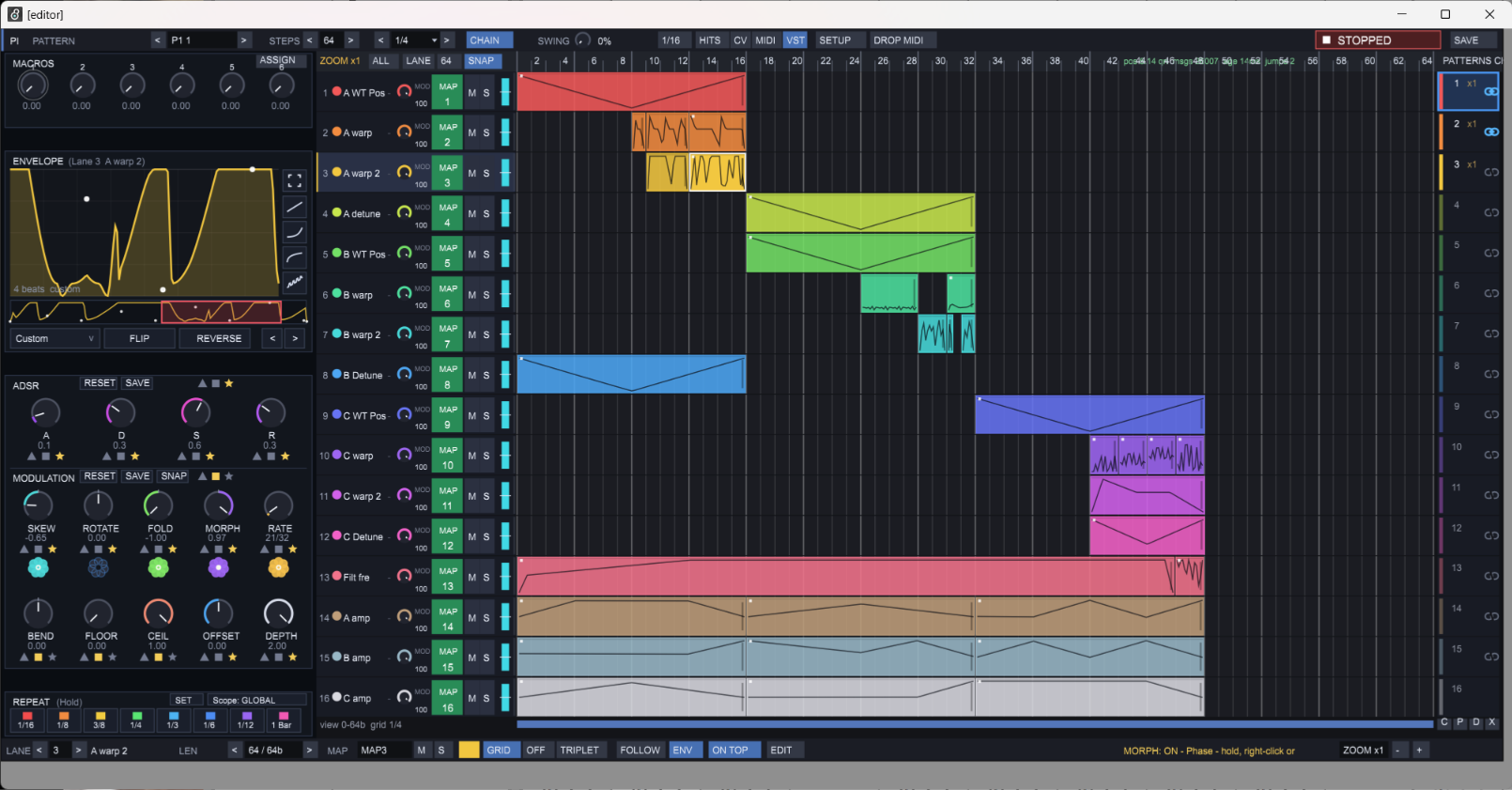 1
2
3
4
5
6
7
8
Six knobs that can each move up to fifteen destinations, including any parameter in your Live Set.
The selected clip's shape, with quick curve tools. Click it to open the full advanced editor.
Ten knobs that reshape an envelope without redrawing it: skew, rotate, fold, morph, rate, bend, floor, ceiling, offset, depth.
Name, mod amount, output and mute / solo. In VST mode the MAP box links the lane to a plugin parameter with two clicks.
Envelope clips on a step grid. Straight, triplet and dotted feels can live side by side in one lane.
CV, MIDI or VST for the whole instrument. The drawing stays the same; only the destination changes.
Sixteen patterns. Link them into a chain and set how many times each one plays.
Hold a button to loop the current moment at one of 24 divisions, a performance tool borrowed from drum machines.
Look at a modular case and count what actually produces or processes audio. Oscillators, filters, VCAs, effects. Much of the rest is modulation: LFOs, envelopes, sequencers, sample & hold, function generators.
Modulation is control data: a voltage that changes over time. A DAW generates control data with perfect precision, locks it to tempo, and saves it with the project. A DC-coupled interface such as the Expert Sleepers ES-8 or ES-9 turns that data back into voltage, as does a MIDI-to-CV converter such as the Endorphin.es Shuttle Control.
Spend rack space and budget on what can't be made inside the computer: the audio. Let the computer handle the modulation.
That doesn't make hardware modulation obsolete. It's worth being precise about where each one is strongest:
| Task | Better in | Why |
|---|---|---|
| Tempo-synced LFOs and envelopes | DAW | Sample-accurate, any shape, recalled with the Set |
| Drawn, multi-point shapes | DAW | No hardware module offers free drawing |
| Many parallel modulators | DAW | No rack space, power or cost per lane |
| Reacting to the rack | Hardware | Envelope followers, gate-triggered envelopes: no computer round-trip |
| Audio-rate FM | Hardware | Not what an envelope editor is built for |
| Playing without a computer | Hardware | Obvious, but it matters on stage |
Each lane device outputs a DC signal on its track. Route it to an interface output. Gain, offset, calibration and a hard safety limit are set per output.
14-bit pitch bend or 14-bit CC per lane gives 16,384 steps, smooth enough for pitch and filter sweeps through a MIDI-to-CV converter. 7-bit CC is there for gear that needs it.
Click a lane's MAP box, then click any plugin knob. The lane drives that parameter at audio rate, scaled around where you left the knob.
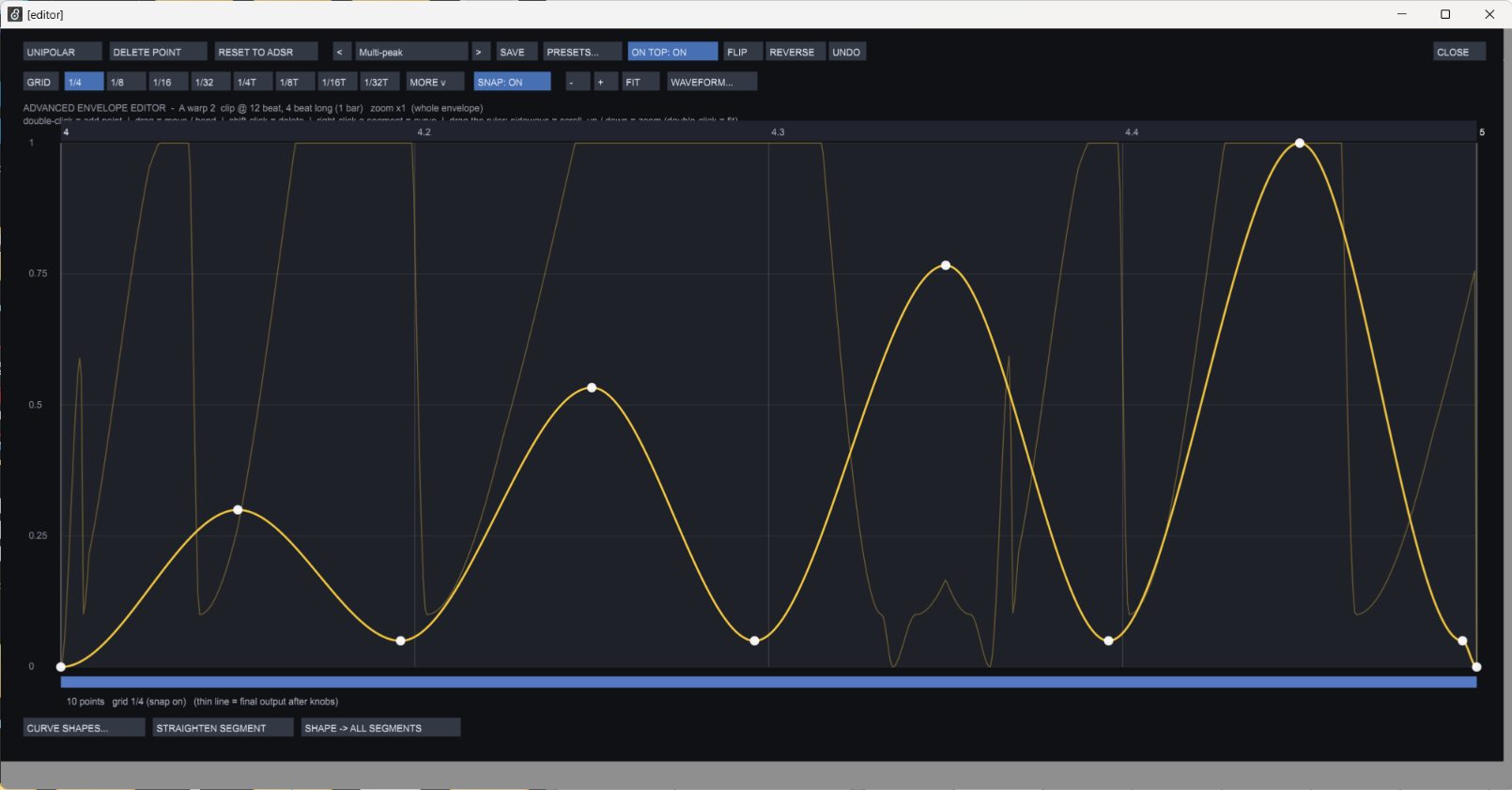
The advanced editor. The bright line is the drawn envelope; the thin line behind it is the output after the modulation knobs.
It was developed with AI assistance, and it ships with every Max patch and every line of JavaScript.
That changes what buying software means. If you want a different layout, another output format or a new curve shape, you can make the change yourself, or describe it to an AI model and let it do the work. Your version is yours to keep or share.
It also means the device doesn't depend on its author. If development stops, the code is still in your hands.